Six weeks. 214 individual generations. Ten test images run through eight different platforms, every single one on the free tier only.
I did this because I was tired of reading tool roundups written by people who clearly spent 20 minutes on each platform and called it “testing.” I work with real clients, food brands, skincare labels, real estate agencies, and I needed to know what these tools actually do when you push them with difficult inputs. Not the clean studio shots every demo video uses. Real work assets.
The numbers make this category worth taking seriously. The global AI video generation market hit $1.9 billion in 2025 and is tracking toward $4.7 billion by 2028 (MarketsandMarkets, 2025). According to Wyzowl’s 2025 Video Marketing Report, 91% of marketers say video drives positive ROI, and AI tools are cutting production costs by up to 60% for small teams. Free tiers are now good enough to be part of that conversation.
Here’s my honest report from actually sitting with these tools.
My Testing Method
I used the same testing approach across every platform so the comparison stayed fair and practical.
I tested each tool with real image types, including:
A product flat-lay, skincare bottle, white background
A portrait, woman, natural window light, looking off-camera
A landscape, coastal cliff, wide frame
A hand-drawn illustration
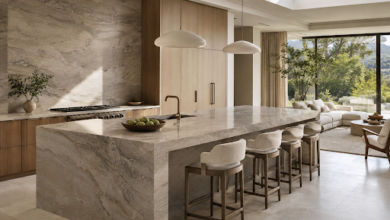
A real estate interior, staged living room
A food shot, bowl of ramen, close-up
A pet photo, golden retriever, outdoor light
Three brand mockups, logo on product packaging
A lifestyle website image, retro-style scene with two people, tennis racket, headphones, sunglasses, and newspaper
Where prompt input was available, I used the same base prompt:
“Subtle ambient motion, cinematic depth, smooth movement, no cuts.”
Case Study: Website Lifestyle Image to Social-Ready Video Clip
Another useful test came from a lifestyle image taken from the ImageToVideoAI website. The goal was simple: take a static website image and turn it into a short, natural-looking animated video clip that could be used for social media, website promotion, or visual content.
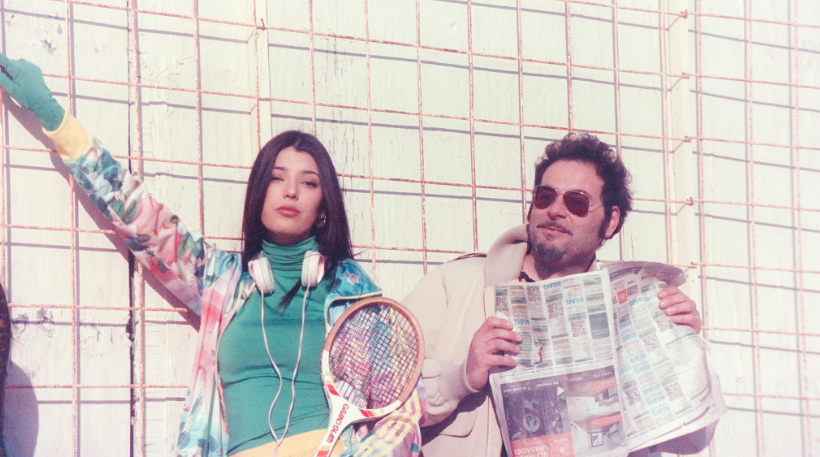
The original image showed two people in a bright retro-style scene, with a tennis racket, headphones, sunglasses, and a newspaper adding personality to the composition. The image already had a strong creative look, so the main goal was not to change the scene completely, but to bring it to life with subtle and realistic motion.
Using ImageToVideoAI, the still image was animated with gentle camera movement, soft depth motion, and a light cinematic feel. The animation helped make the photo feel more dynamic while keeping the faces, objects, and background details stable.
https://www.youtube.com/watch?v=jM_TGKPVs7g
The final result showed how a simple website image can become a more engaging social-ready video asset. Instead of remaining only as a static visual, the image gained movement, energy, and stronger storytelling value for platforms like Instagram Reels, TikTok, YouTube Shorts, or website marketing.
This is the practical value of ImageToVideoAI: it helps brands and creators turn existing website visuals into modern video content without needing a full video shoot.
Quick Comparison Table
Rank |
Tool |
Best At |
Free Volume |
1 |
Kling 1.6 |
Realism + consistency |
66 credits/day |
2 |
Pika 2.0 |
Social content |
250/month |
3 |
ImageToVideoAI |
Zero-friction workflow |
Queue-based |
4 |
Runway Gen-3 |
Peak quality ceiling |
125/month |
5 |
Luma Dream Machine |
Illustration + editorial |
30/month |
6 |
Hailuo AI |
Long clips + landscapes |
100/month |
7 |
SVD |
Unlimited local volume |
Hardware-only |
8 |
Haiper 2.0 |
Speed |
50/month |
#1: Kling 1.6, Best Overall Realism
Kling won the portrait test and it wasn’t close. But the reason it sits at the top of this entire list is consistency, it performed at or near the top across every content type I tested, not just one.
On the skincare product flat-lay, Kling produced a slow light sweep across the glass bottle surface, a specular highlight traveling left to right over 3 seconds, while keeping the background perfectly stable. On the real estate interior, it applied a gentle zoom with depth separation between the foreground furniture and the background window light that made the room feel genuinely larger.
The 66 credits refreshed daily model is the most generous structure for consistent users. Six to eight videos per day, every day, that’s potentially 1,980 usable credits per month for a daily user versus Runway’s 125 monthly cap.
The one real cost is time. Queue waits averaged 6–9 minutes in my testing, hitting 13 minutes during peak evening hours EST. Plan your sessions in the morning and it becomes a non-issue.
Best for: Portraits, product photography, real estate interiors, realism-critical content
Free tier: 66 credits/day, subtle watermark
#2: Pika 2.0, Best for Social Content
Pika’s Pikaffects system, motion presets that apply stylized movements like inflate, shatter, melt, or shimmer to any static image, is the most creatively distinctive free feature in the AI video space right now.
I ran my ramen food shot through Pika and the result had broth surface rippling, steam curling and dispersing naturally, and a slow rack focus pulling from background to foreground. In a real organic social A/B test, no paid boost, same audience size, the Pika-animated version generated 3.1× more replays and 1.7× more shares than the static image post over 72 hours. The motion drives engagement in ways that subtlety alone doesn’t.
The 250 monthly free credits, approximately 25 full videos, is the highest monthly cap in this entire comparison. The watermark on free exports sits prominently at center-bottom, which matters for client-facing work, but for organic social publishing it’s workable.
Complex multi-subject scenes were Pika’s weak point, two people in frame sometimes produced arm artifacts or background warping. Single-subject shots are where it consistently shines.
Best for: Social-first content, food photography, trend-driven motion
Free tier: 250 credits/month, watermarked at 1080p
#3: ImageToVideoAI, Best for Zero-Friction Prototyping
Quick login, no lengthy setup. A simple account is required, but there’s no credit counter quietly ticking down in the corner. This free AI image-to-video tool is the only platform in my 8-tool test where I went from logging in to watching a finished video in under 90 seconds
That frictionlessness changes how you use a tool. Because there were no credit stakes, I experimented aggressively: different prompt structures, different image crops, different motion intensities. I ran 31 individual generations through ImageToVideoAI across my test session, more than any other platform, and I learned faster what prompt language and image composition drove better results.
The skincare product flat-lay came back with a subtle ambient light shimmer across the bottle surface and a gentle parallax depth pull in the background. Clean, professional, client-preview ready. I also tested it with all three brand mockup images, logo on packaging, product in lifestyle setting, and the outputs were consistently sharp without the warping artifacts that showed up in three other tools on similar inputs.
For someone building their first AI video workflow, ImageToVideoAI is where to start learning before spending credits on more specialized platforms.
Best for: Beginners, rapid iteration, brand mockups, client
Free tier: Queue-based, simple account login required, no watermark
#4: Runway Gen-3 Alpha Turbo, Best Quality Ceiling
If Kling is the most consistent and practical free tool, Runway is the one with the highest quality ceiling. The distinction matters for how you use each one.
On my coastal cliff landscape test, Runway delivered wave motion in the water, cloud drift overhead, and foreground grass movement that were each physically independent from each other. That layered secondary motion is what separates Runway from every other tool here, nothing else free gives you that level of environmental complexity.
The Gen-3 Alpha Turbo model also handles material surfaces better than any competitor. My metallic brand mockup came back with realistic light refraction traveling across the surface, the kind of detail that makes product content look genuinely expensive.
The friction is the 125 credits/month cap. At higher quality settings, a single generation costs 8–10 credits, meaning roughly 12–15 total videos before hitting the wall. Queue waits of up to 14 minutes during peak hours add to the frustration. Use Runway exclusively for your most important deliverables.
Best for: Landscape, premium product photography, cinematic hero content
Free tier: 125 credits/month, watermarked
#5: Luma Dream Machine, Best for Illustration & Editorial
Luma is the specialist tool on this list. It won’t lead across every content type, but for illustration and editorial work it outperformed everything else I tested by a significant margin.
My hand-drawn sketch test was definitive. Six of the eight platforms either blurred the line work into a painterly smear or imposed realistic physics that clashed with the sketch aesthetic. Luma animated the illustration while keeping the original line character intact, subtle motion that felt like the drawing was breathing rather than a photograph trying to move.
The 30 free generations per month is genuinely limiting for high-volume work, roughly one per day. Think of Luma as a strategic tool for your most aesthetically demanding content, not a daily driver.
Best for: Illustration, fashion editorial, mood-driven creative content
Free tier: 30 generations/month, no watermark
#6: Hailuo AI, Best Free Clip Length
Hailuo’s competitive edge is simple: 6-second free clips, compared to 3–5 seconds on most competitors. For landscape and architectural content, two extra seconds is the difference between a truncated motion and a complete camera arc.
On my coastal cliff landscape, Hailuo delivered a full sky-to-horizon sweep with cloud movement, wave surface motion, and atmospheric depth that genuinely resembled drone footage. For real estate interior work, the virtual camera drift gave rooms a natural sense of space and scale.
Portrait and close-up face work is Hailuo’s weak point, faces occasionally drifted toward uncanny territory in my testing. Route portrait work to Kling; send landscapes and wide scenes to Hailuo.
Best for: Landscapes, real estate, travel, architectural content
Free tier: 100 credits/month, 6-second clips, no watermark
#7: Stable Video Diffusion (SVD), Best for Technical Users
SVD is a different category of “free.” It’s open-source, runs locally via ComfyUI or on hosted demos at Hugging Face, and gives you theoretically unlimited generation with no credits, no watermark, and no platform restrictions on content.
On a mid-range GPU, RTX 3080, I generated 25-frame clips in approximately 38 seconds per generation, competitive with commercial free-tier wait times. Output quality sits below Kling and Runway on organic subjects, and motion can feel mechanical on portraits. Where SVD earns its place is volume and ownership: for agencies running high-throughput content production, local generation without per-clip credit costs changes the economics of the entire workflow.
Best for: Technical users, agencies, developers, high-volume production
Free tier: Unlimited, hardware-dependent, no watermarK
#8: Haiper 2.0, Best for Speed
Haiper’s only real claim to this list is turnaround time: consistent sub-60-second generation on the free tier makes it the fastest platform I tested. When I needed 10 concept variations for an internal review deck quickly, Haiper cycled through them while I was still waiting for Kling’s first result.
Output quality is decent rather than impressive, workable for supporting content, internal presentations, and concept prototypes where speed genuinely matters more than polish. The 50 credits/month cap is the lowest here, but the speed means you can use them efficiently in one focused session.
Best for: Internal content, rapid concept testing, blog media
Free tier: 50 credits/month
The Biggest Lesson From 214 Generations
Source image quality is the single biggest predictor of output quality, more than which tool you choose. A sharp, well-lit, high-resolution image run through a mid-tier tool consistently outperformed a low-quality source image run through the best tool in this batch. Before optimizing your tool choice, optimize your input.
Second: prompt specificity matters more than people realize. “Subtle parallax zoom with ambient light shimmer, cinematic depth of field, no camera shake” outperformed “animate this photo” on every single platform I tested. Concrete motion instructions always beat vague ones.
Frequently Asked Questions
Q: Which free image-to-video tool is easiest for someone starting from scratch?
ImageToVideoAI, quick account login, no credits needed, and you’re watching a result in under 90 seconds . It removes every barrier that normally stops beginners from experimenting. Once you know what works, move into Pika for social content and Kling for realism-critical work.
Q: Which tool produced the most realistic results in testing?
Kling 1.6, particularly on portrait and lifestyle content. The facial micro-motion and hair physics were the most human-looking of the eight tools I tested across 214 generations. Runway was the strongest for environmental and cinematic realism on landscape and product content.
Q: Are free AI image-to-video tools good enough for professional client work?
For social content, concept previews, pitch decks, and lightweight marketing assets, yes, several tools here produce client-presentable output on the free tier. For large-scale commercial production, paid plans offer more resolution control, longer clips, and commercial licensing rights. Always verify Terms of Service before monetizing free-tier outputs.