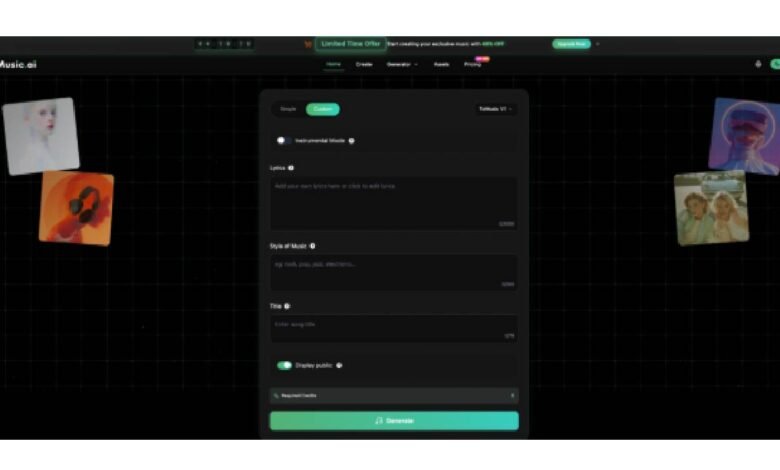
Creating original music used to require a recording studio, a composer, expensive equipment, and weeks of production time. Today, that entire process has been compressed into a single tool: type what you want, and the AI generates a finished, royalty-free track in seconds. This shift is not incremental — it fundamentally changes who can make music, how fast they can make it, and what they can do with it commercially.
Text to Music on ToMusic.ai is one of the most complete platforms available for this kind of AI-powered music creation. This article covers exactly how the platform works, what makes it different from a standard stock music library, and how creators across different use cases are building original music into their content workflows.
What Text to Music AI Actually Does
The core function of a text to music generator is to take written input — a description, a set of lyrics, or a style tag — and produce a complete musical composition. The output is not pulled from a library of pre-recorded tracks. It is generated from scratch by a machine learning model trained on millions of songs, covering melody, harmony, rhythm, vocal expression, and arrangement.
ToMusic.ai extends this base capability across several layers:
- Four AI models (V1, V2, V3, V4) with progressively advanced generation quality
- Two creation modes — Simple Mode for fast generation and Custom Mode for full control
- Vocal and instrumental output: — choose between AI-sung songs with lyrics or pure music beds
- Songs up to 8 minutes — long enough for full YouTube videos, podcast segments, or film scenes
- Over 15 specialized generators for specific creative contexts
The practical result is a platform that handles everything from a quick background track for a social media post to a fully produced song with custom lyrics and professional vocal performance.
Two Creation Modes: Choose Your Level of Control
Simple Mode — Fast and Accessible
Simple Mode is built for speed. You describe the music you want in plain language — up to 500 characters — and the AI generates a complete track. No configuration required. No music knowledge is needed.
Example prompts that work well in Simple Mode:
- “Upbeat tropical house, energetic, bright synths, travel vlog background”
- “Warm acoustic folk ballad, nostalgic tone, fingerpicked guitar, female vocal”
- “Dark cinematic score, tense and building, no vocals, film trailer style”
The AI interprets your description, identifies the implied genre, mood, tempo, and instrumentation, and produces a finished piece. Simple Mode is ideal when you need music quickly and want the AI to handle all creative decisions.
Custom Mode — Full Creative Control
Custom Mode is where ToMusic.ai’s depth becomes apparent. In Custom Mode, you control every parameter:
| Parameter | What You Can Define |
| Lyrics | Write your own — up to 3,000 characters on V1, extended on V2–V4 |
| Song structure | Use [Verse], [Chorus], [Bridge], [Intro], [Outro] tags |
| Style tags | Up to 200 characters: genre, mood, instruments, tempo, vocal type |
| Model selection | V1 for speed, V4 for maximum vocal quality and expression |
| Output type | Vocal song or instrumental track |
Custom Mode is the right choice when the music needs to match a specific creative brief — whether that is a brand jingle with exact tonal requirements, a song built around lyrics you have written, or a film cue with a defined emotional arc.
How to Use Text to Music on Tomusic
The fastest path to your first generated track:
- Go to ToMusic.ai — no account required to browse; free account setup takes under a minute
- Choose Simple Mode for your first generation — describe your target sound in 1–2 sentences
- Preview the result — if it’s close but not right, adjust the description and regenerate
- Switch to Custom Mode when you’re ready to write your own lyrics or need precise control over style, structure, and model
- Download in MP3 or WAV — both formats supported on paid plans; ready for immediate deployment
For creators who want to explore specific use cases before testing the general generator, the specialized tools (Story Song, Relaxing Music, Vlog Music, and others) are accessible directly from the platform’s generator menu and provide the most targeted results for their respective creative contexts.
The Four AI Models and When to Use Each
ToMusic.ai Text to Music AI provides access to four generations of its AI engine. Choosing the right model for your project is the fastest way to improve output quality.
| Model | Max Length | Best Application | Key Strength |
| V1 | 4 minutes | High-volume content, quick turnaround | Fast processing, reliable output |
| V2 | 8 minutes | Cinematic scoring, ambient music | Enhanced tonal depth, extended duration |
| V3 | 8 minutes | Complex arrangements, rich harmonics | Sophisticated harmonic structures |
| V4 | 8 minutes | Professional vocal songs | Genuine vocals, emotional authenticity |
When to Choose V4
ToMusic V4 is the flagship model. It delivers genuine vocal performance with emotional depth — not a generic AI delivery, but a vocal interpretation that responds to the emotional content of your lyrics. For any project where the vocal performance carries the song, V4 is the right choice.
When to Choose V2 or V3
V2 excels at long-form atmospheric and cinematic music. If you are scoring a documentary, creating ambient background audio for a meditation app, or producing game environment music, V2’s extended tonal depth produces more immersive results than a shorter model.
V3 is optimized for harmonic complexity. For music with sophisticated chord progressions, unusual rhythmic patterns, or a rich layered arrangement, V3 handles harmonic decisions more precisely than V1 or V2.
When to Choose V1
V1 is the most efficient model — 4-minute tracks, streamlined controls, and the fastest processing speed in the lineup. For content creators generating music at high volume, or for any project where speed and consistency matter more than maximum musical complexity, V1 delivers reliable results quickly.
How Different Creators Use ToMusic.ai
Content Creators and Social Media
For creators producing content for TikTok, Instagram Reels, and YouTube, the core problem is producing original, on-brand music at the speed of content production. Stock libraries solve the volume problem but not the originality problem — thousands of creators use the same tracks, which dilutes brand identity over time.
ToMusic.ai solves both simultaneously. You generate original music from your own brief, at the speed you need it, with a commercial license that covers every platform. Creators who develop a consistent prompt formula — the same genre, mood, and instrumentation parameters across all their content — build a recognizable sonic identity that audiences begin to associate with their channel before any visual branding appears.
Marketing and Advertising Teams
Marketing teams use ToMusic.ai to produce brand jingles, product theme music, explainer video soundtracks, and advertising audio without waiting for external composers or paying per-track licensing fees.
The ability to generate multiple musical variations from the same brief and compare them in a single session is particularly valuable for A/B testing — testing which musical approach produces better engagement or conversion rates on paid social ads is now a practical workflow rather than a budget-intensive experiment.
Game Developers and Filmmakers
ToMusic.ai’s professional generation quality — particularly V3’s harmonic sophistication and V4’s emotional vocal depth — makes it viable for background scores, character themes, level music, cinematic soundtracks, and orchestral pieces.
For indie developers and independent filmmakers working without dedicated music budgets, the platform provides access to production-quality music that would otherwise require a composer and a recording session. V2’s extended duration and tonal depth are specifically suited to the sustained, evolving music that game environments and documentary films require.
Educators and Personal Projects
ToMusic.ai makes music creation accessible for educational songs, study music, meditation tracks, personal compositions, and any creative project that benefits from original audio without requiring musical training. The platform supports culturally diverse music styles, giving educators and creators working across different cultural contexts the tools to generate music appropriate to their specific audiences.
Flexible Pricing and Free Access of Tomusic Text to Music
ToMusic.ai offers tiered pricing based on usage volume and feature access, with a free entry point that requires no credit card. New accounts receive free generations using the V1 model — enough to test the platform’s core capability and quality before committing to a paid plan.
Paid plans unlock all four models, extended generation length, and higher concurrent generation slots for creators producing music at volume. The platform currently offers a 40% discount on premium plans, making the step into professional-tier generation accessible for individual creators and small teams.
Summary
ToMusic.ai’s text to music platform brings together four AI models, two creation modes, 15+ specialized generators, and unrestricted commercial licensing in a single interface. It handles everything from instant background music generation to fully custom song production with user-written lyrics and professional vocal performance. For creators, marketers, developers, and anyone who needs original music without a traditional production workflow, it removes every barrier that has historically made original music inaccessible — cost, time, and technical expertise.