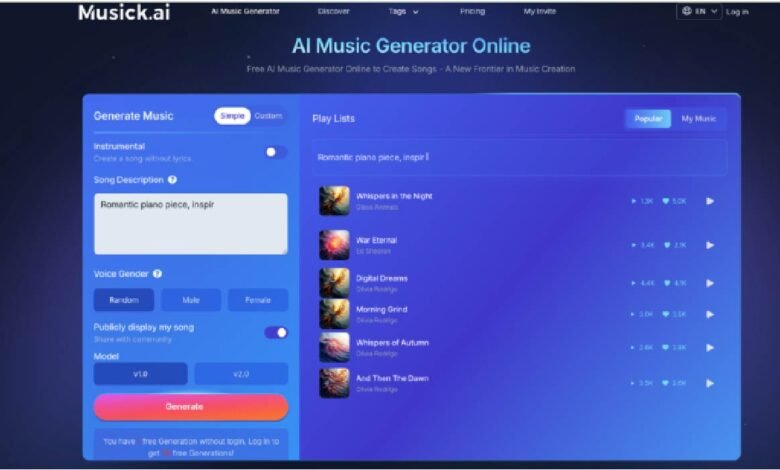
White noise playlists and lo-fi radio streams have their place — but they’re generic. They don’t know whether you need something melancholy after a rough Tuesday or something breezy for a Sunday morning. Musick AI, a free AI Music Generator, changes that equation entirely. Instead of settling for someone else’s idea of “relaxing,” it lets anyone build the precise sound that actually works for them — no musical training required.
I. Why Generic Playlists Fall Short
Most people reach for a pre-made playlist and hit shuffle, hoping something sticks. The problem is simple: mood is personal, and a playlist built for millions rarely fits one person perfectly.
- One Size Does Not Fit All
A track that soothes one person can feel too slow or too busy for another. The instruments, tempo, and vocal tone all matter — and those preferences shift from day to day.
- The Repetition Problem
Streaming playlists loop. After a few sessions, the familiarity that once felt comforting starts to feel predictable, and the effect wears off.
- Mismatch Between Mood and Music
Pre-labeled “chill” or “sleep” playlists rarely account for nuance. There’s a real difference between the music someone needs after a stressful commute and what they need during a slow Sunday afternoon.
II. What Musick AI Actually Does
Musick AI is an AI-powered music generation tool that creates original songs and instrumentals from a text description. Users describe what they want — genre, mood, instruments, vibe — and the tool builds something new.
- Text-to-Music Generation
Type a prompt like “soft acoustic guitar, slow tempo, calm evening feeling,” and Musick AI generates a unique track based on that description. The more specific the input, the more tailored the result.
- Instrumental or Vocal Tracks
Users can choose between instrumental-only compositions and songs with vocals. For unwinding purposes, an instrumental track with no lyrics can be especially effective — nothing to process, just sound.
- Vocal Customization
When a vocal track is preferred, Musick AI allows users to choose the vocalist’s gender, adding another layer of personalization to the listening experience.
III. Genres That Actually Help You Relax
One of Musick AI‘s strongest points is genre range. The platform supports a wide span of musical styles, which means the definition of “relaxing” doesn’t have to be narrow.
- Jazz and Classical for Focused Calm
Both jazz and classical are available as genre options. These styles work particularly well for people who want background music that isn’t intrusive — something that occupies the ear without demanding attention.
- R&B and Acoustic Pop for Emotional Release
Sometimes unwinding isn’t about silence — it’s about feeling something and letting it go. R&B and softer pop styles can serve that purpose well.
- Reggae, Blues, and Beyond
Musick AI also supports reggae, blues, disco, saxophone-focused tracks, and K-pop, among others. The variety means users aren’t locked into one narrow version of what relaxation music should sound like.
IV. The Tools That Make It Flexible
Beyond basic music generation, Musick AI includes several specialized tools that expand what’s possible.
- AI Song Lyrics Generator
For those who want to sing along or create something more personal, the AI Song Lyrics Generator takes genre inputs and produces lyrics automatically. It’s useful for anyone building a custom wind-down routine that includes journaling, movement, or even just humming.
- AI Beat Producer
The AI Beat producer allows users to write down melody notes directly, giving more hands-on control over rhythm and pace — useful when the generated output needs a specific feel.
- AI Rap Generator
For users whose unwinding looks more like energy release than stillness — a run, a drive, a workout — the AI Music Rap Generator lets them design music sheets and select genre, producing something with the right energy for active decompression.
V. Practical Use Cases for Unwinding
Musick AI isn’t just a novelty — it fits into real routines in concrete ways.
- Background Music for Evening Routines
Cooking, stretching, or reading at the end of the day goes smoother with the right background track. A single prompt can produce an instrumental that fits the pace of a slow evening without any guesswork.
- Personalized Sleep Soundscapes
Rather than picking from a library of pre-made sleep tracks, users can describe exactly the kind of sound they want — soft piano, ambient tones, slow strings — and generate something that hasn’t been heard a hundred times before.
- Content Creation Without Stress
Creators who make YouTube videos, podcasts, or social media content often spend too long searching for the right background track. Musick AI generates royalty-free music that can be used commercially across platforms like YouTube, Instagram, and TikTok — removing one more source of friction from the creative process.
VI. Copyright-Safe and Ready to Use
A common concern with AI-generated music is licensing. Musick AI builds its music library with full consent and strict adherence to copyright laws. Every generated track comes with a commercial license, which means users can actually use what they create — for personal enjoyment, social content, or professional projects — without needing to verify rights or worry about takedowns.
- No Attribution Required
Generated music is owned and usable by the person who created it, without complicated attribution chains.
- Safe for Social Platforms
Tracks generated through Musick AI are cleared for use on major platforms. This removes one of the most common headaches for anyone creating content around their relaxation or wellness routines.
- Private Listening Options
For registered users, generated music is kept private — visible only to them. This matters for people who are creating something personal and don’t want it publicly indexed.
VII. How to Get Started in Minutes
Getting a personalized track out of Musick AI doesn’t require any setup or music knowledge. The process is straightforward.
- Describe the Sound
Open the generator and type a description of the music needed. Include the genre, mood, and any instruments that feel right. Something like “slow jazz piano, late night, mellow and warm” works well as a starting prompt.
- Choose Instrumental or Vocal
Decide whether the track needs vocals. For pure unwinding, instrumental is often the better choice — but both options are available instantly.
- Generate, Preview, and Refine
The AI Song Maker produces results quickly. Preview the track, and if it’s close but not quite right, adjust the description and generate again. The iteration process is fast and doesn’t require any technical knowledge.
- Download and Use
Once the right track is found, it can be downloaded immediately. From there, it’s ready to use in any context — a personal playlist, a video, or simply playing through a speaker at the end of the day.
Conclusion
Relaxation is specific. The sounds that genuinely help someone unwind are rarely what a generic playlist delivers. Musick AI offers a direct alternative — describe exactly what’s needed, generate it, and use it. With a wide genre range, flexible tools like the AI Music Maker, lyric generation, beat production, and a clear commercial license, it removes the gap between what someone needs to hear and what they can actually find.