The honeymoon phase of generative AI—where typing a simple string of adjectives and hitting “generate” felt like magic—has largely transitioned into a more demanding operational phase. For indie makers and prompt-first creators, the challenge is no longer just about generating a single striking image. It is about architectural consistency, the ability to modify existing assets without destroying their core composition, and the integration of static visuals into motion workflows.
As the market saturates with wrappers and basic interfaces, the criteria for selecting a production-grade toolset must shift from “what can it generate?” to “how much control do I retain after the first click?” Moving beyond the prompt requires a clear-eyed evaluation of functional parity—ensuring that your digital workbench has the same level of utility as a traditional suite, but with the efficiency of modern diffusion models.
The Shift from Discovery to Utility
Early adoption of AI tools was driven by discovery. Users were exploring the “latent space,” seeing what the models were capable of. However, in a professional or semi-professional workflow, the goal is rarely discovery. It is execution. When you need a specific hero image for a landing page or a consistent set of social media assets, the randomness of high-variance models becomes a liability rather than a feature.
This is where the distinction between a generator and an editor becomes critical. A generator creates from nothing; an editor refines what exists. For creators, the ideal workflow is a hybrid. You might start with a model like Flux or Nano Banana to establish a base, but the heavy lifting happens in the post-generation phase. Evaluating an AI Photo Editor involves looking at how it handles the “destructive” versus “non-destructive” nature of AI edits. If you remove an object, does the inpainting maintain the lighting and perspective of the original shot, or does it introduce artifacts that require another round of generation?
Model Diversity as a Requirement
One of the most significant limitations in current AI workflows is the “single-model trap.” No single model—be it from Google, OpenAI, or Black Forest Labs—is the best at everything. Some excel at photorealism, while others are superior at understanding complex spatial prompts or rendering legible text.
An operator-led approach requires access to a spectrum of models. When evaluating a platform, you should check for the presence of specialized engines. For instance, using Flux for high-detail textural work and switching to a faster, more “compliant” model for iterative layout testing is a common strategy. If a tool locks you into a single proprietary model, you are beholden to that model’s specific biases and blind spots.
Functional Requirements for the Modern Creator
Beyond the generation of the image itself, there is a suite of “utility” functions that determine whether a tool is a toy or a workhorse. These are the boring, practical features that save hours in production.
The Role of High-Fidelity Upscaling
Most generative models output at a resolution that is insufficient for print or high-definition web use. The “hallucination” risk during upscaling is high; a poor upscaler will add strange textures to skin or smooth out necessary architectural details. A robust AI Image Editor must offer upscaling that respects the original intent while adding genuine pixel density. This is not just about making the image larger; it is about “re-interpreting” the image at a higher scale without losing the specific character of the original.
Precision Object Removal and Inpainting
Generative fill and object erasure are often marketed as “one-click” solutions. In practice, they are rarely that simple. A primary limitation often encountered is the “seam” problem—where the edited area doesn’t quite match the grain or noise profile of the surrounding image. High-quality tools address this by analyzing the global context of the photo before performing the fill. If you are evaluating a tool, test it on complex backgrounds, such as a lattice fence or a crowd of people, to see how the logic holds up.
The Transition from Static to Motion
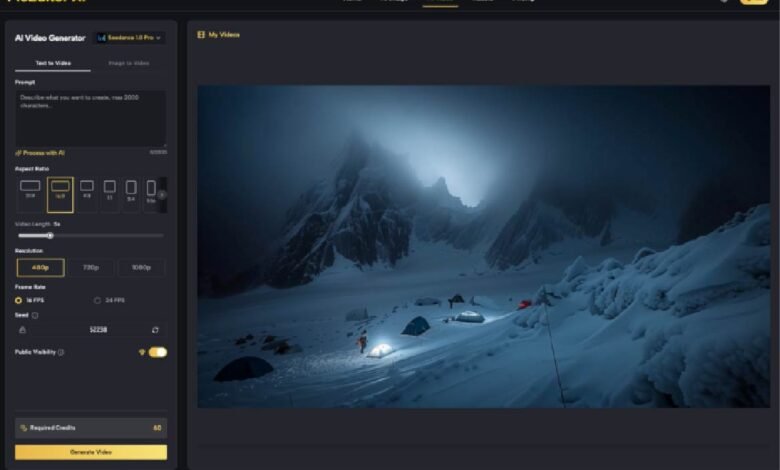
For many indie makers, the next frontier is video. The leap from a static image to a 5-second clip is technically massive. This is where “temporal consistency” becomes the phrase of the day. It is one thing to have a beautiful image of a woman in a Victorian room; it is quite another to have her move her hand without the dress morphing into the floor or her face changing identity mid-motion.
Current state-of-the-art video models like Kling or Veo are making strides, but users should maintain a level of skepticism. Video generation is still in its “experimental” phase. Artifacts are common, and the physics of movement—how hair flows or how shadows move—can often feel “uncanny.” When building a workflow, the image-to-video path is generally more reliable than text-to-video because the image provides a structural “anchor.” Using a photo you’ve already refined in an AI Photo Editor as the source frame for a video generation provides the model with a clear blueprint, reducing the chances of the output diverging into nonsense.
Operational Bottlenecks and Limitations
It is important to reset expectations regarding “automation.” While AI can accelerate the creative process by a factor of ten, it rarely eliminates the need for human oversight. There are two specific areas where current technology often fails to meet professional standards without significant manual intervention.
The Problem of Spatial Accuracy
Models often struggle with “left of,” “behind,” or “partially obscured by.” If your creative brief requires a very specific arrangement of objects—say, a product on a table with a specific type of plant three inches to the left—you will likely find yourself frustrated. The prompt is a blunt instrument. In these cases, the ability to use “Image-to-Image” or “ControlNet”-style features is essential. You need to be able to give the AI a rough sketch or a layout guide rather than relying on language alone.
Text and Branding Consistency
While models like Flux have improved text rendering, they are still prone to spelling errors and font inconsistencies. For a marketer, this means you cannot yet rely on an AI Image Editor to produce final ad creative with embedded copy in a single pass. The workflow remains: generate the visual, remove any AI-generated gibberish, and layer your typography in a traditional design tool. Attempting to force the AI to do the final typesetting is usually a waste of compute credits.
Cost and Velocity in Creative Operations
For a solo creator or a small team, the cost is not just the monthly subscription; it is the time spent on “failed” generations. A tool that produces a usable result in 3 tries is significantly more valuable than a free tool that takes 30 tries.
When evaluating platforms like PicEditor AI, look at the aggregation of features. Having background removal, face swapping, and video animation in one interface reduces the “friction of context switching.” Every time you have to download an image from one tool and upload it to another, you lose data (often through compression) and you lose time.
The Strategic Perspective for 2024 and Beyond
The goal for any creator right now should be building a “stack” that is model-agnostic. The underlying technology is moving too fast to tie your entire production pipeline to a single API or a single interface. Use tools that give you access to the latest breakthroughs—whether that is the latest version of Seedance for video or Google’s latest imaging models—without requiring you to learn a new UI every three months.
The winners in the generative space will not be those who can write the best prompts, but those who can most effectively “curate and correct.” The AI Photo Editor is the new darkroom. It is where the raw data of a generation is developed into a finished piece of media.
Final Practical Judgment
Before committing to a specific AI Image Editor or a broader generative workflow, run a stress test. Do not just generate “a cat in a space suit.” Try to generate a specific scene, then try to change the color of the cat’s suit without changing the cat. Then try to upscale that image to 4K and turn it into a 5-second video.
The points of failure in that specific chain will tell you everything you need to know about the tool’s readiness for your workflow. We are at a point where the “wow factor” has diminished, and we are left with the practicalities of production. Choose tools that prioritize control, model variety, and functional utility over hype and flashy demos. The most valuable AI tool is the one that stays out of your way and lets you finish the job.