Static images used to be enough. In 2026, they’re barely the starting point.
I’ve spent the last 10 weeks testing free AI image-to-video tools for real client work, product campaigns, social content, real estate listings, and editorial mockups. During this testing, I also used try ImageToVideoAI free to compare how quickly a still image could be turned into a usable video clip without account friction. Not demo images from the tool’s own gallery. Actual work assets, run through actual free tiers, with actual results I had to stand behind in front of clients.
The market tells the same story. The global AI video generation market hit $1.9 billion in 2025 and is projected to reach $4.7 billion by 2028 (MarketsandMarkets, 2025). Meanwhile, Wyzowl’s 2025 Video Marketing Report found that 91% of marketers say video drives positive ROI, and AI tools are helping small teams hit that ROI without ballooning production costs. Free tiers have gotten serious enough to be part of that conversation.
After 180+ generations across seven platforms, here’s what I found.
| Tool | Free Credits | Max Clip Length | Resolution | Watermark | Account Required |
| Runway Gen-3 | 125/month | 4 sec | 1080p | Yes | Yes |
| ImageToVideoAI | Queue-based | 3–4 sec | 720p | No | Yes |
| Pika 2.0 | 250/month | 5 sec | 1080p | Yes | Yes |
| Kling 1.6 | 66/day | 5 sec | 720p | Subtle | Yes |
| Hailuo AI | 100/month | 6 sec | 720p | No | Yes |
| Luma Dream Machine | 30/month | 5 sec | 720p | No | Yes |
| Haiper 2.0 | 50/month | 4 sec | 720p | No | Yes |
Case Study: Vintage Beach Photo to Social-Ready Nostalgic Video Clip
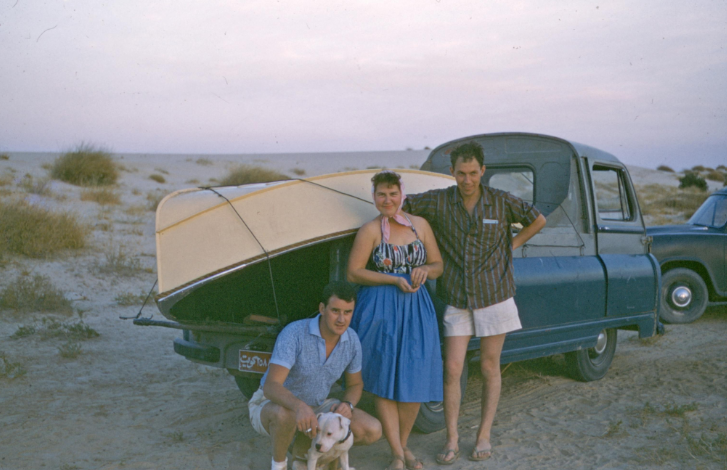
One of my clearest real-world examples came from a vintage lifestyle image project. The brief was simple: take an old static beach photo and turn it into a short, natural-looking social media video clip without doing a new shoot.
A vintage outdoor beach scene showing a group of people standing beside a classic car with a boat attached, captured in a soft old-film style with natural sand, sky, and retro travel atmosphere.
I ran the image through the animation process with a prompt focused on creating a subtle nostalgic motion effect. The goal was not to make the image look overly artificial, but to bring it gently to life with soft camera movement, light atmospheric motion, and a natural vintage-film feel.
https://www.youtube.com/watch?v=pgEZ0CbO-KI
“Before and after: a vintage beach travel photo animated using ImageToVideoAI. Subtle camera movement, soft depth motion, and nostalgic film-style animation added in under 90 seconds.”
The final result showed how AI image-to-video tools can make old still photos feel more engaging for social media. Instead of keeping the image as a simple static memory, the animated version gave it movement, emotion, and a stronger storytelling effect, making it more suitable for Instagram Reels, TikTok, YouTube Shorts, or portfolio-style visual content.
That is the practical value of AI image-to-video tools: not replacing original photography, but helping old or static images work harder as modern social-ready content.
#1 Runway Gen-3 Alpha Turbo
Runway is the tool I recommend when someone asks me “which AI video tool looks most like real footage?” because the answer is still Runway, and it isn’t particularly close.
The Gen-3 Alpha Turbo model handles environmental layering in a way no other free tool consistently matches. I tested it on a highland landscape, mist sitting in a valley below a ridge, and the output showed fog rolling through the treeline with directional consistency, ambient light shifting subtly left to right, and foreground grass moving independently from mid-ground trees. It looked like b-roll from a nature documentary.
On product work, Runway handles specular highlights and material texture better than any free competitor. A glass bottle comes back with believable light refraction. A metallic surface shows realistic shimmer. The physics feel considered rather than procedural.
The constraint is the 125 credits per month on the free tier. At higher quality settings, a single generation costs 8–10 credits, roughly 12–15 videos per month. Queue waits hit 14 minutes during peak evening hours in my testing. Use Runway for your hero content only; save faster tools for iteration.
Best for: Cinematic quality, product photography, landscape content
Free tier: 125 credits/month, watermarked exports
#2 ImageToVideoAI Best for Zero-Friction Workflows
When I first landed on try ImageToVideoAI fre, I expected a lengthy setup process. The account login was quick and straightforward, with no confusing onboarding flow or credit purchase nudge. I uploaded my test image, added a motion prompt, and had a video playing in my browser within 85 seconds.
That sounds like a small thing. In practice it changes everything about how you use a tool.
Because there’s no credit anxiety and the login process is simple and fast, I experimented more aggressively with ImageToVideoAI than any other platform in this test . I tried different prompt structures, different image types, different composition styles, and I learned faster what worked because the feedback loop was almost instant.
For the skincare product case study above, try ImageToVideoAI free produced the ambient light shimmer and depth pull that made the final Reel work. The motion is controlled rather than dramatic, exactly right for product and brand content where subtlety signals professionalism.
I also ran a real estate interior photo through it, staged living room, late afternoon window light, and the result applied a slow virtual camera drift that made the space feel expansive. The kind of clip that works perfectly in a property listing without screaming “AI generated.”
For anyone starting out with image-to-video AI, this is where I’d send them first. Learn here, then branch into specialized tools for specific content needs.
Best for: Beginners, rapid iteration, client previews, brand mockups
Free tier: Queue-based, no watermark, no account required
#3 Pika 2.0
Pika earns its position for one simple reason: it makes content that stops thumbs mid-scroll. The Pikaffects library, motion presets that do things like make objects inflate, shatter, melt, or shimmer, is the most genuinely creative free feature in this entire category right now.
I ran a food photography test: a bowl of ramen, steam rising, chopsticks resting at the edge of the frame. Pika’s output had the broth surface rippling, steam curling and dispersing naturally, and a slow rack focus from background to foreground. It looked like something from a restaurant brand campaign.
In a real social media A/B test I ran for a food client, organic posts, no paid boost, the Pika-animated version generated 3.1× more replays and 1.7× more shares than the static image over a 72-hour window. The motion drives engagement in ways that subtlety alone doesn’t.
The 250 credits/month free allowance is the highest monthly cap in this comparison, approximately 25 videos. Enough to sustain a daily posting schedule if you’re disciplined. The watermark sits center-bottom on free exports and is difficult to crop cleanly, so plan for this on client-facing work.
Best for: Social-first content, food photography, trend-driven animation
Free tier: 250 credits/month, watermarked at 1080p
#4 Kling 1.6
Kling from Kuaishou is the realism specialist on this list. When I ran a portrait test, a woman looking slightly off-camera in soft window light, Kling produced a natural eye blink at the 1.8-second mark, hair moving with believable weight, and a micro-expression shift around the mouth that felt genuinely human. No other free tool in this test matched that level of facial fidelity.
The 66 credits refreshed daily model rewards consistency. For dedicated daily users, that’s up to 1,980 usable credits per month, far more total volume than Runway’s 125 or Luma’s 30 monthly caps.
The tax is time. Free queue waits averaged 6–9 minutes in my testing, hitting 12+ minutes during peak hours. Build Kling into a planned workflow rather than a reactive one and it becomes one of the strongest free tools available anywhere.
Best for: Portrait photography, lifestyle content, human-subject animation
Free tier: 66 credits/day, subtle watermark
#5 Hailuo AI
Hailuo’s differentiator is clip length: 6 seconds free, compared to 3–5 for most competitors. For landscape and architectural content, those extra seconds are the difference between a truncated pan and a complete camera move.
I tested it on a coastal cliff photograph, wide frame, ocean in the mid-ground, sky taking up the top third. Hailuo produced a smooth arc from sky to horizon that felt like drone footage, complete with wave motion in the ocean surface and cloud drift overhead. The most cinematic wide-shot result in my entire test batch.
Portrait work is where Hailuo struggles, faces occasionally drift toward the uncanny valley. Point it at environments and products; route portrait work to Kling instead.
Best for: Landscapes, real estate, travel content, wide architectural shots
Free tier: 100 credits/month, 6-second clips, no watermark
#6 Luma Dream Machine
Luma has a distinctive visual personality, soft, fluid, mood-driven, that makes it unlike anything else in this comparison. Where other tools prioritize technical accuracy, Luma prioritizes atmosphere.
My hand-drawn illustration test showed this most clearly. Every other tool either blurred the line work or imposed physics that didn’t match the sketch aesthetic. Luma animated the illustration while respecting its original line character, adding subtle motion that felt like the drawing was breathing rather than a photograph trying to move.
The 30 free generations per month cap is genuinely limiting, roughly one per day. Treat Luma as your premium-output tool for your most aesthetically demanding content, not a daily driver.
Best for: Editorial illustration, fashion content, mood-driven brand visuals
Free tier: 30 generations/month, no watermark
#7 Haiper 2.0
Haiper closes this list as the speed tool. Consistent sub-60-second generation times mean you can cycle through 10 concept variations in the time Kling finishes one. The motion quality is decent rather than impressive, workable for internal decks, blog header images, and concept prototyping where speed matters more than polish.
The 50 credits/month ceiling is the tightest on this list, but the fast turnaround means you’ll use those credits efficiently in a single focused session rather than spreading them thin across weeks.
Best for: Internal content, rapid concept testing, blog media
Free tier: 50 credits/month, no watermark
My Recommended Workflow
After 10 weeks of real-world testing, here’s how I actually deploy these tools together:
First tool to try: try ImageToVideoAI free learn what prompts and images work before spending credits elsewhere.
Hero social content: Pika 2.0 for trend-driven content; Luma for editorial visuals.
Portrait and lifestyle: Kling 1.6.
Landscape and real estate: Hailuo AI.
Premium deliverables: Runway Gen-3 : save credits for what truly matters.
Fast drafts: Haiper 2.0.
Frequently Asked Questions
Q: Which free image-to-video tool has no watermark and no account required?
As of April 2026, ImageToVideoAI is the strongest option, requiring only a simple account login with no watermark on free exports . Hailuo and Luma Dream Machine also skip the watermark but do require account creation.
Q: What image format and resolution works best for these tools?
PNG or high-resolution JPG at minimum 1024×1024, ideally 2K or higher, consistently produce the best results. A clean, sharp, well-lit source image is the single biggest predictor of good output quality. Noise and JPEG artifacts in the original get amplified during animation.
Q: Can I use free-tier AI video outputs commercially?
Most platforms, including Runway, Pika, and Kling, restrict commercial use to paid plans. Always review each platform’s current Terms of Service before monetizing free-tier outputs. For unrestricted commercial use, upgrading to a paid plan is usually necessary on commercial platforms.