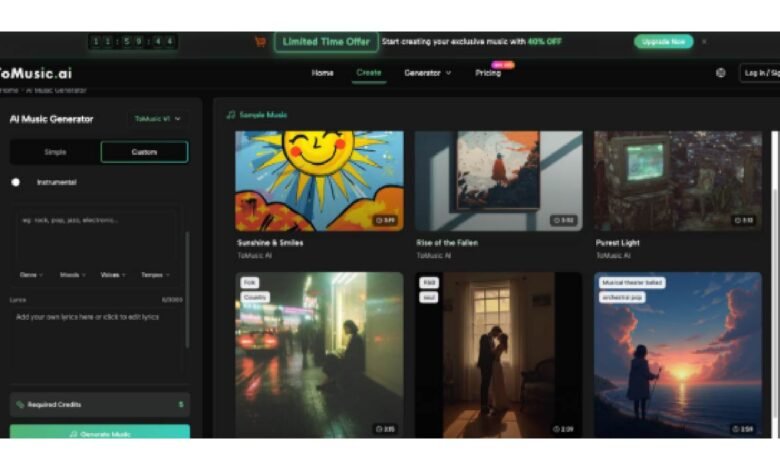
Original music once required instruments, studios, and years of training. Today, a single sentence can become a fully produced song in seconds. Text to song AI has removed every barrier between a creative idea and a polished musical track — giving creators, marketers, educators, and musicians an entirely new way to express themselves. As AI music generation becomes mainstream in 2026, knowing how to use these tools effectively makes all the difference between generic output and genuinely compelling original music.
Why Creating Original Music Still Frustrates Most People
Despite the explosion of AI tools, many users still struggle to turn their ideas into satisfying musical results. The pain points are familiar and consistent:
- Vague prompts yield vague music: Most people type something like “happy song” and get mediocre output — not because the AI is limited, but because the input isn’t specific enough to guide it.
- No music theory knowledge: Without understanding of genre, tempo, key, or instrumentation, it’s hard to describe what you actually want — leaving most users guessing at every step.
- Wrong tool for the wrong job: Different projects require different AI models. Using a quick background music engine to score a cinematic film sequence almost always disappoints.
- Lyrics that don’t fit the melody: Writing custom song lyrics is a craft. Without structural guidance, words rarely translate naturally into singable, well-paced songs.
- Licensing traps: Many AI music tools generate content that cannot legally be used in monetized YouTube videos, ads, or commercial campaigns — creating serious legal risk for creators who skip the fine print.
Understanding these pitfalls is the first step toward getting truly great results from any text to song AI platform.
The AI Music Platform Built for Real Creative Control
Not all AI music generators are created equal. Text to music AI platforms differ enormously in the depth of control they offer, the quality of their output, and the flexibility of their licensing. ToMusic.ai stands out as one of the most comprehensive text to song AI platforms available today — built around four specialized AI models, dual creation modes, a growing library of specialized generators, and full commercial rights on every track generated.
Four Specialized AI Models, One Platform
ToMusic.ai’s most significant differentiator is its multi-model architecture. While most platforms offer a single generation engine, ToMusic gives users access to four distinct models, each optimized for different creative goals:
- ToMusic V4 — delivers the most genuine, emotionally expressive vocals with full 8-minute composition support, ideal for professional releases and broadcast-quality productions.
- ToMusic V3 — excels at innovative rhythmic patterns and sophisticated harmonic structures, perfect for complex musical arrangements.
- ToMusic V2 — designed for cinematic, ambient, and extended musical journeys with enhanced tonal depth and instrumental richness.
- ToMusic V1 — a fast, reliable engine for quick content creation, background music, and high-volume workflows supporting up to 3,000 characters of custom lyrics.
The ability to run multiple models simultaneously and compare results side by side is a feature that professional creators and content teams will find genuinely invaluable — and it’s something no major competitor currently offers at this level.
Simple Mode vs. Custom Mode
ToMusic.ai offers two distinct creation pathways. Simple Mode allows you to describe the style, mood, and emotional arc you’re after in plain language — the AI handles every musical decision automatically. Custom Mode delivers full creative control: write your own lyrics with structure tags like [Verse], [Chorus], [Bridge], and [Outro], specify detailed style parameters, define vocal characteristics, and set tempo and instrumentation. Both modes produce royalty-free, commercially licensed tracks with no watermarks or attribution requirements.
Specialized Generators for Every Creative Context
Beyond the core engine, ToMusic.ai includes a growing collection of purpose-built specialized generators — including a Story Song Generator, Mood Song Generator, Dream Song Generator, Relaxing Music Generator, Vlog Music Generator, Poems to Music Generator, and more. Rather than crafting a complex prompt from scratch, these context-aware tools guide the AI toward music that fits a specific creative scenario from the start.
Six Practical Tips for Better Text to Song AI Results
These strategies consistently improve output quality across any AI music platform, and deliver especially strong results on ToMusic.ai:
- Be specific in your prompts — Instead of “happy pop song,” write: “upbeat female-vocal pop track, driving electric guitar, 120 BPM, catchy chorus, summer anthem feel.” Specificity is everything.
- Use song structure tags in Custom Mode — Apply [Verse], [Chorus], and [Bridge] tags in your lyrics to give the AI clear structural guidance. This dramatically improves how naturally your words flow as a song.
- Match the model to the project — Use V4 for professional vocal tracks, V3 for complex arrangements, V2 for cinematic or ambient work, and V1 for fast background music generation.
- Generate multiple versions in parallel — ToMusic.ai supports concurrent generation, so run the same prompt across different models at once and compare before committing to a final track.
- Iterate with micro-adjustments — If the first result isn’t right, change one element at a time — tempo, mood, vocal tone — rather than rewriting everything. Small refinements often produce big improvements.
- Export in WAV format for professional use — Always download in WAV when your track will be used in video production, film, or broadcast. The lossless quality makes a noticeable difference in professional delivery contexts.
How Leading Text-to-Song Platforms Compare in 2026
| Tool | Core Strength | Best For | Free Plan |
| ToMusic.ai | 4 AI models + 8-min songs + full commercial rights | All creators, marketers, filmmakers | Yes — 8 free songs, no card needed |
| Suno AI | Catchy pop and mainstream tracks | Social media creators | Yes (25 songs/day, watermarked) |
| Udio | High-fidelity audio generation | Music enthusiasts, indie artists | Yes (limited credits) |
| Soundraw | Royalty-free background music | Video producers, YouTubers | No (paid plans only) |
| Boomy | Quick song creation with distribution | Casual creators | Yes (limited) |
ToMusic.ai’s multi-model flexibility is its clearest competitive advantage. While Suno and Udio deliver excellent single-model quality, ToMusic gives users the right engine for each project — combining 8-minute compositions, vocal removal, stem extraction, specialized generators, and full commercial licensing in one platform, starting completely free.
Conclusion
The best way to understand what text to song AI can do for your creative work is to experience it firsthand — whether you’re building a content channel, scoring a film, running a marketing campaign, or simply exploring music creation for the very first time. If you’re ready to transform your ideas into studio-quality original music instantly, start for free with ToMusic.ai today — 8 songs are on the house, no credit card required. Your next original track is already in the words you have.