The flood of AI image tools over the past eighteen months has been nothing short of overwhelming. Every week brings another model claiming to be faster, more realistic, or more creative than the last. Yet for anyone who has actually tried to use these tools for real work—not just prompting for fun—the gap between promise and practical usability remains frustratingly wide. Prompts get ignored. Characters drift across generations. Styles refuse to stick. And video? That is a whole separate headache requiring yet another platform, another subscription, another learning curve. That is precisely why Image to Image caught my attention during a late-night research session. Not because it claims to be the best at any single thing, but because it appears to have solved something more valuable: the friction of actually using multiple state-of-the-art models in a coherent workflow.
Over the past two weeks, I have put the platform through a series of real-world creative tests—from product visualization to character-driven storytelling, from static style transfers to animating stills into short clips. What follows is not a promotional walkthrough. It is a practical account of what works, what does not, and where this tool fits into a serious creative or commercial process.
A Practical Testing Framework for Real Creative Work
Before diving into results, it is worth clarifying how I approached this evaluation. The goal was not to generate the most impressive single image possible—any decent model can do that with enough tries. Instead, I focused on three dimensions that actually matter for professionals: consistency across multiple generations, control over specific visual elements, and the ability to move seamlessly between image and video without restarting the creative process.
I ran tests across four common use cases: style transfer for brand assets, character consistency for a short visual series, product visualization from rough reference photos, and animating key images into social-media-ready clips. Each test involved multiple attempts, different prompt styles, and comparisons across the available models. The results varied significantly by model and task—which, as it turns out, is exactly the point of having multiple models in one place.
The Model Lineup: More Than Just a Laundry List
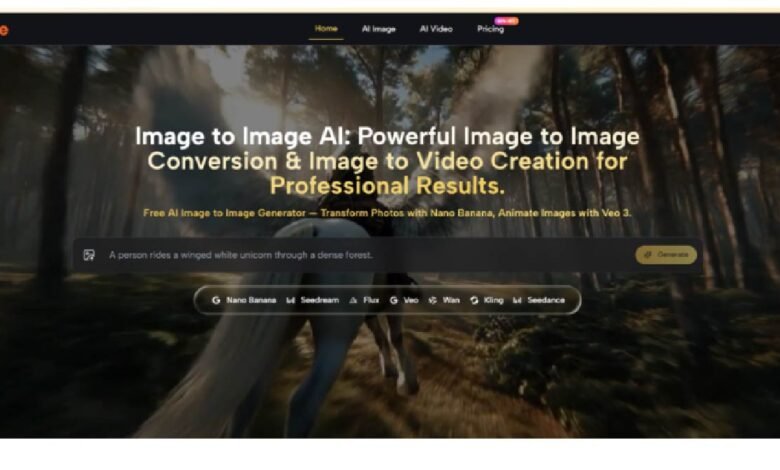
ToImage.ai aggregates several leading models under a single interface, and understanding their personalities is essential to getting good results. Nano Banana appears to be the workhorse for image-to-image transformations, delivering consistently high photorealism with accurate texture rendering and material representation. In practice, this means skin looks like skin, fabric drapes naturally, and metallic surfaces catch light in ways that feel physically plausible. During a test converting a flat product photo into a lifestyle shot, Nano Banana preserved the product’s core geometry while convincingly placing it in a completely new environment with matching shadows and reflections.
For more experimental or stylized work, Seedream offers notably faster generation times, making it useful for rapid iteration when exploring directions. Grok and GPT-4o provide additional creative angles, though in my testing, their outputs were more variable and required more careful prompt engineering to achieve consistent results.
The real standout, however, is the video generation capability powered by Veo 3 and Veo 3.1. Uploading a static image and adding a motion prompt produces clips that feel genuinely cinematic. In one test, a portrait of a character standing in a snowy landscape was animated with subtle wind movement through the hair and clothing, plus drifting snow particles. The result was not perfect—some motion artifacts appeared around the edges—but the overall impression was far beyond what I have seen from competing tools at similar price points.
How the Workflow Actually Works
The platform’s interface is refreshingly straightforward, avoiding the cluttered dashboards that plague many AI creative tools. Getting from an idea to a finished asset involves a clear sequence of steps.
Step One: Upload Your Source Material
Starting with What You Already Have
The process begins with uploading a reference image. This can be anything from a smartphone photo to a professional studio shot. The system accepts standard formats and provides immediate visual feedback once the image is loaded. Unlike some platforms that force you into a rigid template, ToImage.ai keeps the upload process flexible and uncomplicated.
Describing the Transformation
Once the image is uploaded, the next action is describing what you want to change. This is where the platform’s approach to prompt interpretation becomes apparent. Rather than requiring highly technical or stylized language, the system responds well to natural descriptions. For example, “turn this into a watercolor painting with a warm sunset palette” produced results that genuinely reflected both the style and color direction. More complex requests, such as “change the background to a futuristic city skyline while keeping the subject’s pose and lighting consistent,” required some iteration but ultimately delivered usable results.
Step Two: Select and Compare Models
Running Multiple Models Simultaneously
One of the more useful features is the ability to generate transformations with multiple models at the same time. This allows side-by-side comparison of outputs from Nano Banana, Seedream, Grok, and others without running the same prompt repeatedly. In practice, this saves significant time when experimenting with different aesthetic directions. The differences between models are often substantial enough that seeing them together makes the right choice obvious.
Using Reference Images for Consistency
For projects requiring character or brand consistency, Nano Banana supports up to four reference images. This proved valuable during a test where I needed to maintain a specific character’s facial features across multiple scenes. By providing three reference shots from different angles, the model generated new scenes with the same character remaining recognizable—though not perfectly identical. The consistency was good enough for social media content and storyboards, though perhaps not yet for production animation work.
Step Three: Generate and Refine
Reviewing and Iterating
Generation times vary by model and task complexity. Seedream delivers results in seconds, making it ideal for quick exploration. Nano Banana takes slightly longer but produces noticeably higher detail and realism. Video generation with Veo 3 requires more time due to the computational demands of motion synthesis and audio synchronization. The platform provides clear progress indicators, and the results are stored in an organized history that makes revisiting and refining previous work straightforward.
Commercial Licensing and Output Quality
All generated content comes with full commercial rights, no watermarks, and no attribution requirements. This is a significant differentiator for professionals who need to use assets in client work, marketing campaigns, or product listings without additional licensing fees or legal uncertainty.
Where the Platform Excels and Where It Falls Short
| Aspect | ToImage.ai | Typical All-in-One Tools | Specialized Single-Model Tools |
| Learning Curve | Gentle; upload-prompt-generate workflow | Often cluttered with unnecessary options | Steep; requires model-specific prompt knowledge |
| Model Variety | Multiple premium models in one place | Usually one or two mediocre models | One excellent model, but no alternatives |
| Image-to-Video Integration | Native; no separate tool or workflow | Rarely included | Not applicable |
| Character Consistency | Supported with up to 4 reference images | Inconsistent or absent | Excellent, but only within that model’s ecosystem |
| Generation Speed | Varies by model; Seedream is very fast | Generally slow | Fast for that specific model |
| Commercial Rights | Included in all paid plans | Often restricted or unclear | Usually included but at higher cost |
The platform’s greatest strength is also its most subtle: it removes the friction of switching between tools. In a typical workflow, moving from image generation to video animation requires exporting from one platform, importing into another, re-prompting, and hoping the results align. ToImage.ai keeps everything in one place, which sounds minor until you have done it the hard way a few dozen times.
The limitations are worth acknowledging honestly. Prompt quality remains the dominant factor in output quality—garbage in, garbage out still applies. Complex scenes with multiple interacting elements sometimes produce artifacts or inconsistent lighting. Video generation, while impressive, does not always maintain perfect subject consistency across longer clips, and results may vary between attempts. The platform is not a magic wand; it is a well-designed set of tools that still require thoughtful input and occasional iteration.
Who Benefits Most from This Approach
For social media managers and content creators who need to produce high volumes of varied visuals, the combination of multiple models and video capability in one place is genuinely time-saving. Being able to generate a dozen style variations of a single product photo and then animate the best one into a short video clip—all without leaving the platform—changes the pace of content production.
For marketers and e-commerce professionals, the commercial licensing and product visualization features address real operational needs. Generating lifestyle imagery from simple product shots reduces dependency on expensive photoshoots, and the ability to visualize products in different settings enables faster A/B testing of creative concepts.
For independent creators and storytellers, the character consistency features open up possibilities for visual series and brand development. Maintaining a recognizable protagonist across multiple scenes or episodes is no longer restricted to studios with dedicated concept artists.
For casual users experimenting with AI creativity, the platform offers enough flexibility to explore without requiring deep technical knowledge, though the free tier is primarily a starting point rather than a sustainable workflow for heavy usage.
A Few Practical Limitations Worth Noting
No tool is without constraints, and transparent evaluation requires acknowledging where ToImage.ai does not yet excel. The quality of results depends heavily on the quality of input images and prompts. Low-resolution or poorly lit source images produce correspondingly limited results. Complex scenes with multiple subjects or intricate backgrounds sometimes confuse the models, requiring multiple generation attempts to achieve a satisfactory output.
Video generation, while impressive in demonstration, does not always deliver broadcast-ready quality on the first attempt. Motion can appear slightly unnatural, and complex actions may produce visual artifacts. The platform is best suited for short-form social content and concept visualization rather than professional film production—at least for now.
The pricing structure, while reasonable for professional use, may feel steep for hobbyists. The Starter plan at $8.30 per month (billed annually) provides 10,000 credits, which translates to roughly 416 images. For occasional use, this is economical. For heavy daily production, the Unlimited plan at $75 per month offers better value but represents a significant commitment.
The Verdict: A Practical Tool for Practical Work
After two weeks of consistent use across multiple project types, ToImage.ai has earned a place in my creative toolkit. It does not claim to be the absolute best at any single task—Midjourney still produces more consistently stunning images in certain styles, and dedicated video tools offer more granular control. What it does offer is something arguably more valuable for working professionals: a coherent, low-friction environment where image generation, style transfer, character consistency, and video animation coexist without the usual headaches of platform switching.
The real test came when I needed to produce a short visual story for a client pitch—five scenes featuring the same character in different environments, plus a thirty-second animated teaser. Using AI Image to Image, I completed the entire project in an afternoon. The character remained recognizable across scenes. The style held consistent. The video clip, while not perfect, conveyed the mood and motion I needed to sell the concept. The client approved the work without requesting revisions.
That is the measure that matters. Not benchmark scores or feature checklists, but whether a tool helps you get real work done faster and with less frustration. By that standard, ToImage.ai delivers. It is not the flashiest AI platform on the market, and it does not pretend to be. It is simply a well-built workspace where multiple capable models are organized into a workflow that makes sense for the way creative professionals actually work. For anyone tired of juggling tabs, subscriptions, and inconsistent results, that is worth a closer look.