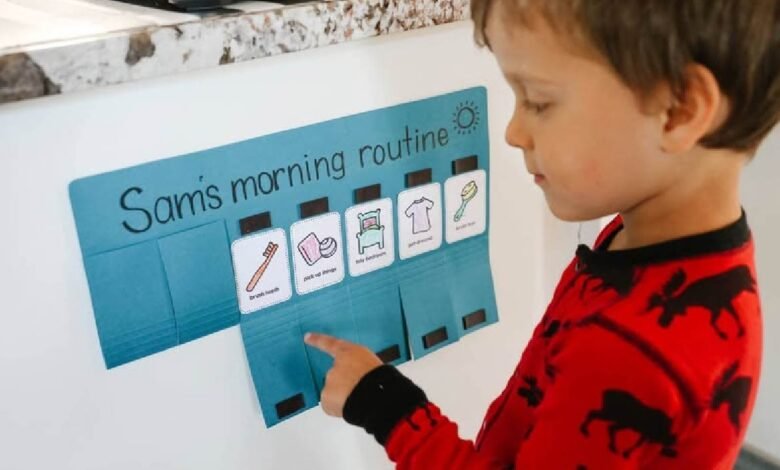
Visual Schedules can greatly affect a person’s life but most end up as wall decorations after the first week of use. A well designed schedule which has a great impact on daily life has been thought of and put into use consistently.
Clear Visual Hierarchy
To make your visual schedule effective information on the schedule should follow a clear visual hierarchy. Information should be immediately readable for the user of the schedule. Large images or text of primary tasks on your schedule and smaller images or text for details and transitional activities. For color coding on your schedule choose a logical system and stick to it. Such as blue for morning routines, green for work activities, red for dinner.
Use consistent spacing and the same size for all elements of the schedule to create a clear structure to indicate the order of activities. Use the largest images or the largest text for the main activities. For transition activities or to provide additional details use the smallest images or text. Only use color coding if it is logical and is used consistently. For example, use blue for morning activities, green for work activities and red for urgent activities. Random use of color can be confusing and be detrimental to the user of the schedule.
In terms of typography, a clear sans-serif font is best. In contrast to decorative fonts that have an unreading character, Arial or Calibri are recommended. The text within a category should always be of the same size. For example, if “Breakfast” is displayed in an 18-point font then all of the other meal times should also be displayed in 18-point font.
Space and physical or digital location of schedule also matters. A schedule displayed in a small amount of space or with too much information displayed within it can be just as negative as a schedule with too much information. Providing adequate space between sections or using “white space” in the schedule can help prevent negative user perception and reduce the potential for cognitive overload. The end result is to create a schedule that looks like a good road map and not a dense, thick manual.
Personalization Beyond Pictures
The majority of visual schedules are ineffective because they are generic and don’t take into account a number of very important factors such as the person’s abilities, daily routines, preferences, and interests. When a schedule is generic, it is likely to be used for a short period of time and then abandoned and become a piece of wall decoration instead of a powerful tool to support people’s daily lives.
The first consideration for a visual schedule is the level of the schedule. The schedule needs to be at a level that the person can understand. Some people can only understand schedules that have photographs, others can only understand schedules that have text in them. The visual schedule is most effective when it is set up in a way that is consistent with the person’s communication style and the way in which they process information.
When working with someone who has a job that requires them to work at irregular hours, a schedule with a flexible nature is required. This means that the activities that the person does during the day may occur at different times on different days. For example, someone who works at night may go to bed at 10am and wake up at 2pm on some days and at 8am and go to bed at 2am on other days. A sequence-based schedule would be best for someone such as this because the activities are put in a logical order to complete tasks throughout the day rather than at specific times.
There are also interests of the person that should be included in the transition activities of the visual schedule. For example, if someone loves trains, you could include some train pictures in the transition activities. Remember that this is in addition to the main activities of the schedule and not in place of them.
Implementation Strategy
The design of your schedule is not enough. The best schedule will not work if it is not introduced and used properly.
Starting off with a few familiar tasks ie: 2-3 and then increasing from there is key to establishing a new schedule system. By starting off with to much too soon the person and their support(s) can give up with the new system as it has been too demanding.
Introducing a person to use a new schedule should start off with small steps too! Start off with 2-3 familiar tasks or activities to help build their confidence in using the visual schedule. The best time to start practicing the new schedule is during the person’s low-stress time of day or week. It would not be ideal to introduce a new schedule during a busy time of day or week when there are already are a lot of changes going on.
Common Design Mistakes That Undermine Effectiveness
Several design choices consistently sabotage visual schedule effectiveness.
Be cautious of overloading the schedule with too much information. It is very easy to include all of the details in the schedule, but remember that the schedule only serves a purpose if it is helping to support the person using it. Only include the information on the schedule that is necessary to support the purpose of the schedule.
Activities are to be represented in the same way on a visual schedule. This means that all of the work tasks are to be represented by the same type of visual, such as photographs or illustrations. If some of the work tasks are to be represented by photographs and others by illustrations, then all of the activities on the schedule are to be represented by photographs. Likewise, all of the activities on the schedule are to be represented by illustrations. Using a variety of different visual representations for different activities on a visual schedule creates confusion and makes the schedule less effective.
When creating a visual schedule many people fail to remember that the tool is to support the person using it. Even after the schedule has been completed it must be fine-tuned. Many people do not take the time to make sure that the visual schedule is working effectively for the person. There are many signs that will indicate that the visual schedule is not working. These signs are: a person avoiding an area where a visual schedule is, a person showing more anxiety during the routine time, or a person asking more and more questions before completing a routine activity. These are just a few signs that indicate that the visual schedule is not working.
Maintenance
Your information on your schedule has to be modified from time to time. Even if your schedule seems to be working really well, there’s always room for improvement. Review your schedule on a monthly basis to see if it is still working.
When developing a visual schedule, it has to be reviewed and changed when necessary on a monthly basis. You should check if parts of the schedule are no longer used. In addition, the images that are used could become outdated or irrelevant. This would also have to be updated. A good visual schedule is one that grows with the user. After a while the user will have turned the schedule into a tool to support him or her in his or her daily routine.
It’s a good idea to keep track of your most effective schedules so you can use that knowledge when you need to make a new schedule or to update an existing one. The ultimate goal is to have your visual schedule work so well that people are no longer even aware that they are following a schedule.